Workday Finance Implementation
Workday Finance Learning Path
| Finance Role/Audience | Training Offered | Support/Format |
ALL Employees using Workday Finance [Please watch first before taking other Finance training] | Banner to Workday Crosswalk Video (13 min) | Drop in Sessions for Help Dates: Oct 12, 14, 15, 19, 20, 22, 26, 27, 28 -help documentation available in Workday |
| ALL Employees with PCard | Reconciling a PCard transaction (1 min) view the expense report videos first | |
| ALL Employees with expense submission or approval | Creating an Expense Report (3 min) Approving an Expense Report (1 min) | |
Cost Center Director, Manager & Financial Analyst | • Procure to Pay training (1.5 hrs) • Budget training (1.0 hr) | Instructor-led / Scheduled sessions -help documentation available in Workday |
| Grants Manager | Federal Grants Videos (26 min) How to certify effort in Workday (8 min), Grants Budget vs Actual Report (10 min), | Individual consults available |
| ALL Faculty | Faculty Awards Video (5 min) | Individual consults available |
| Gift Manager (Former Banner: Financial Manager over a Gift / Endowed Restricted fund) | Gifts Budget video (7 min) | Individual consults available |
| Project Manager (Former Banner: Financial Manager over Capital project fund) | Departmental trainings for Facilities and ITS (1 hr) | Instructor-led / Scheduled sessions |
Accounting Crosswalk information
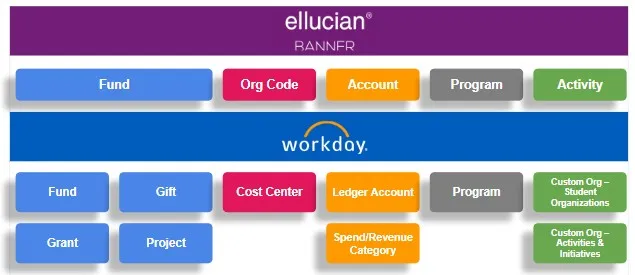
Crosswalk information Banner to Workday Worktags
This 'crosswalk' helps you see how your financial Banner accounting data has been converted into Workday data using the new financial data structure and various worktag elements. A crosswalk is a document that maps the former Banner accounting coding to its new structure in Workday using worktags.
A training video has also been created to describe the new Workday Finance worktags and other accounting information. We recommend watching this video before taking the other Finance training.
Finance Workday Help Documents
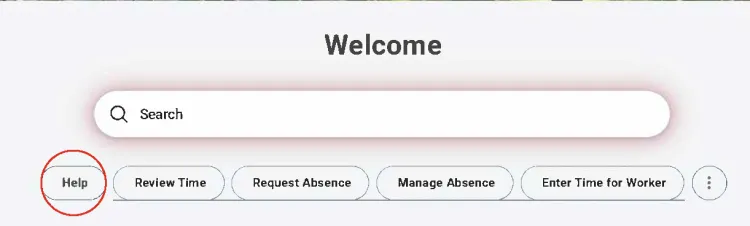
Find step-by-step instructions for Workday Finance processes in Workday. To access these resources, simply type in key words in the search bar on the Workday homepage:
Help Articles Topics:
Budget: Reviewing Budget Report, Create Budget Amendment, Review Grant Budget vs. Actual, Faculty Awards Budget Report
Expenses: Create Expense Report, Create Spend Authorization, Review and Approve Expenses, Create Expense Report Nonworker
Procurement: Create Requisition, Approve Requisition, Create Receipt, Punchout Catalog Requisition
Invoice and Suppliers: Create Supplier Invoice Request, Approve Supplier Invoice, Create New Supplier
Workday Finance Training
A playlist of on-demand videos for various training paths is available on this Workday webpage
Drop-in Help Sessions
For specific questions following training, you can attend any of the following drop-in sessions.
Topics include Procure to Pay, Expense, PCard, Invoices or general Worktag questions.
- Wednesday, Oct 14 9-10:30 a.m. (101 S. Chester Rd Room 002)
- Thursday, Oct 15 11-12:30 p.m. (DCC Room 163)
- Monday, Oct 19 10-11:30 a.m. (DCC Room 163)
- Tuesday, Oct 20 8:30-10 a.m.(101 S. Chester Rd Room 002)
- Thursday, Oct 22 3-4:30 p.m. (Singer 248)
- Monday, Oct 26 3-4:30 p.m. (DCC Room 163)
- Tuesday, Oct 27 10:30-noon p.m. (Singer 248)
- Wednesday Oct 28 9- 10:30 a.m. (DCC Room 163)
Cutover & Q1 Data Information
First-quarter financial transactions (July 1 – Sept. 30, 2026) will be converted into Workday in summary form by late October or early November. Because of this cutover process, only summary-level data will be visible—itemized transaction details will not be displayed. Consequently, budget reports will reflect underreported total expenses until these Q1 numbers are fully loaded. We will send an email update once this process is complete. For those with access to budgets inMySwarthmore, historical Banner financial reporting for Q1 2027 and earlier has moved to the ITS AppGarden site under Financial Reporting.
Important Status Update of Budgets Available in Workday
As of October 12th, some budgets remain in process of being loaded into Workday. We expect the budgets will be loaded prior to October 19th. This webpage will be kept current as the remaining budgets are brought into Workday. Note that this will not impact your access to input requisitions or invoice requests. If you have any questions about your budget, please log a question using the service portal described below.
Budget | Status | Workday Budget Report Name |
Operating Budget | Live in Workday | SWAT- Budget vs. Actual |
Gift Budgets | Live in Workday | SWAT- Gift Budget vs. Actual |
Grant Budgets | Live in Workday | SWAT- Grants Budget vs. Actual |
Faculty Award Budgets | Live in Workday | SWAT - Faculty Awards Budget vs. Actual |
Project Budgets | Not yet available | SWAT- Projects Budget vs. Actual |
Contact Support
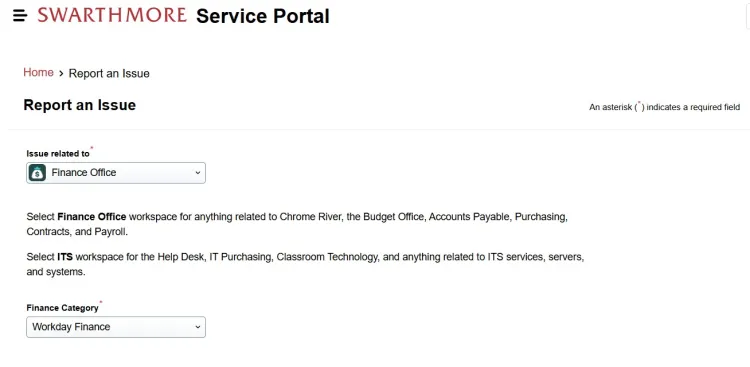
To help facilitate questions and support specifically related to Workday Finance, we will use Freshservice as a dedicated ticketing system. You can submit issues, questions, or requests for additional training by completing this Freshservice form or emailing workdayfinance@swarthmore.edu. In the form, make sure you select 'Issue Related to - Finance' rather than ITS, see screenshot below. Questions will be answered in the order they are received; we greatly appreciate your patience and understanding.